Fast delivery
Discount conditions for companies
Up to 10% discount for pupils, students and educational institutions
Europe-wide: Insured shipping from 4,90€
Fast delivery
Discount conditions for companies
Up to 10% discount for pupils, students and educational institutions
Europe-wide shipping starts at €4.90

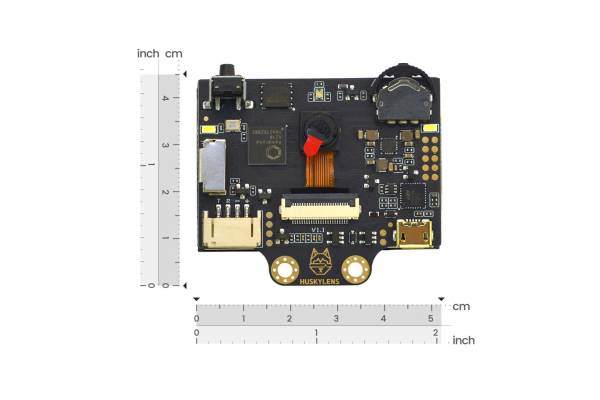
HuskyLens AI camera from DFRobot

€46.90 *
Content: 1 Piece

incl. VAT plus shipping costs

1-3 business days

We are known for

  • Fast shipping across Germany
  • 100,000+ satisfied customers
  • Over 10 years of experience
Other customers also order
DFRobot silicone cover for HUSKYLENS
€4.95 *

    Amazon PayApple Payeps-ÜberweisungGoogle PayiDEALKlarnaMasterCardPayPalVISA
    • F25111095
    • 0,10 kg
    • 8 cm x 6 cm x 3 cm (L x W x H)
    €46.90 * HuskyLens AI camera from DFRobot
    Accessories
    Gravity: HuskyLens K210 AI camera - AI vision for education & training The HuskyLens is a plug & play AI camera (vision sensor) especially for teaching and vocational training: learners can "train" their own recognitions in just a few seconds without complicated modelling or setup - simply align the camera, press the learning button and see the result directly on the screen. This makes topics such as artificial intelligence, sensor technology, robotics and automation immediately... more

    Gravity: HuskyLens K210 AI camera - AI vision for education & training

    The HuskyLens is a plug & play AI camera (vision sensor) especially for teaching and vocational training: learners can "train" their own recognitions in just a few seconds without complicated modelling or setup - simply align the camera, press the learning button and see the result directly on the screen. This makes topics such as artificial intelligence, sensor technology, robotics and automation immediately tangible.

    The camera is ideal for schools (secondary schools I/II) and training (e.g. mechatronics/IT/electronics) as it can be easily combined with other projects, such as Arduino or Raspberry Pi.

    Core elements

    - Immediate feedback on the integrated 2.0" IPS color display: learners see directly what is detected and can debug projects quickly - even without a PC in place.

    - Edge AI on the device thanks to Kendryte K210: computing work happens locally, in real time - without a permanent internet connection.

    - Easy to integrate into existing learning platforms: compatible with micro:bit, Arduino, Raspberry Pi (connection via UART/I²C).

    - Typical teaching & training projects (practical, motivating)

    The HuskyLens brings "eyes" into your prototypes - ideal for project work, makerspaces and exam preparation:

    Face recognition: e.g. "Smart Locker"/access control (discuss data topics: training, error rates, bias)

    Object tracking & object recognition: robot follows a person / sorts components or workpieces

    Line tracking: AGV/vehicle demo for logistics & automation

    Color recognition: sorting system, quality control in the mini "production line"

    Tag/QR code recognition: station operation, interactive learning posters, inventory systems

    Technical highlights (for material list & lesson preparation)

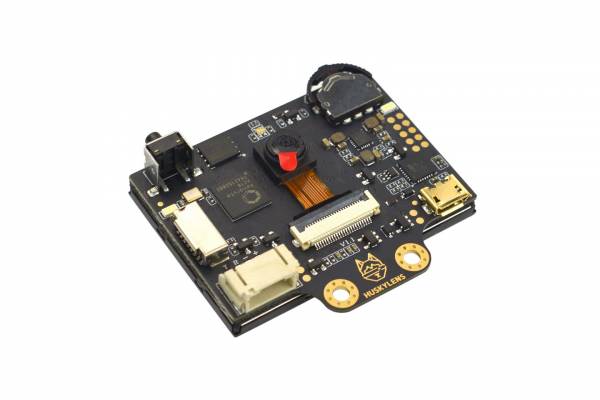
    Processor: Kendryte K210

    Camera: OV2640, 2.0 MP

    Display: 2.0" IPS, 320×240

    Interfaces: UART, I²C

    Power supply: 3.3-5.0 V

    Algorithms (integrated): Face Recognition, Object Tracking/Recognition, Line Tracking, Color Recognition, Tag Recognition

    Learning ecosystem & teaching material

    According to the manufacturer, there are numerous free step-by-step tutorials (40+) and courses, including MakeCode/Mind+ (block-based) and robotics paths (English) to get you started quickly

    The HuskyLens is a robust, easy-to-use AI camera for STEM teaching and training that translates artificial intelligence from the theory block directly into working robotics and automation projects.

    Technical data (overview)

    • Processor / Edge-AI: Kendryte K210

    • Image sensor: OV2640 (2.0 MP) (sometimes also mentioned in the wiki as OV2640/GC0328 depending on the version)

    • Display: 2.0" IPS color display, 320 × 240 px

    • Supply voltage: 3.3-5.0 V

    • Power consumption (typical): 320 mA @ 3.3 V / 230 mA @ 5 V

    • Interfaces: UART, I²C (Gravity 4-pin)

    • USB: for power supply and firmware updates

    • Dimensions: 52 × 44.5 mm (board)

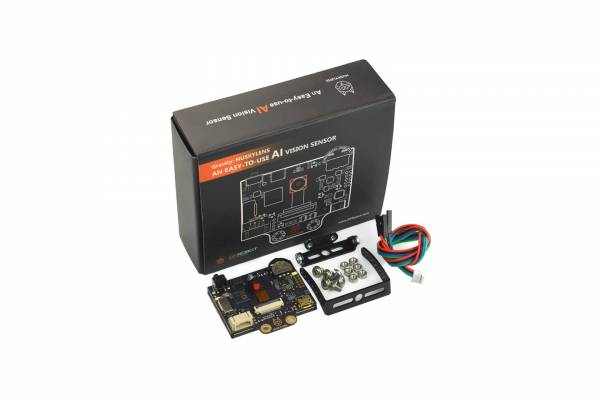
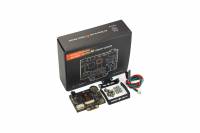
    • Scope of delivery (short): Camera, mounting bracket/raiser, screws/nuts, Gravity 4-pin cable

    Scope of delivery

    HuskyLens AI Camera

    Mounting bracket (small) + elevation bracket

    Screws/nuts (M3)

    Gravity 4-pin sensor cable

    Instructions and tutorials:

    Official DFRobot documentation (EN) - Reference/Manual

    DFRobot Wiki: HuskyLens V1.0 (main doc) - Modes, UART/I²C, examples.
    https://wiki.dfrobot.com/HUSKYLENS_V1.0_SKU_SEN0305_SEN0336

    HuskyLens WIKI Document (PDF) - Manual as PDF (offline/printable).
    https://raw.githubusercontent.com/DFRobot/Wiki/master/SEN0305/res/HuskyLens%20WIKI%20Document.pdf

    Calliope mini (DE) - Teaching material & learning tracks

    Calliope: AI page (HuskyLens in the classroom) - overview & introduction.
    https://calliope.cc/schulen/ki

    Face recognition - step-by-step teaching unit.
    https://calliope.cc/schulen/unterrichtsmaterial/7-1-gesichtserkennung

    Color recognition - step-by-step teaching unit.
    https://calliope.cc/schulen/unterrichtsmaterial/7-2-farberkennung

    Object recognition - step-by-step teaching unit.
    https://calliope.cc/schulen/unterrichtsmaterial/7-3-objekterkennung

    Worksheet (PDF) Color recognition - easy to print as a handout/station.
    https://calliope.cc/download.php?file=schule%2F7_2%2FPAP-HuskyLens-Farberkennung.pdf

    inf-schule: HuskyLens first steps - connection, hints, lesson setup.
    https://inf-schule.de/nkso

    inf-schule: Learning path face recognition - tasks + MakeCode building blocks.
    https://inf-schule.de/informatiksysteme/calliope/projekte/KI_Kamera/lernstrecke/Gesichtserkennung

    micro:bit (EN) - MakeCode, Extensions & Projects

    MakeCode Package: HuskyLens Extension - can be imported directly into MakeCode.
    https://makecode.microbit.org/pkg/dfrobot/pxt-dfrobot_huskylens

    GitHub: pxt-DFRobot_HuskyLens (extension repo) - source code/issues/updates.
    https://github.com/DFRobot/pxt-DFRobot_HuskyLens

    DFRobot Tutorial: HuskyLens 2 + micro:bit (MakeCode) - import, setup, examples.
    https://wiki.dfrobot.com/Tutorial%20for%20HUSKYLENS%202%20and%20micro%3Abit%20Graphical%20Programming%28MakeCode%29

    Instructables: micro:bit Visual Object Tracking with HuskyLens - project based (Tracking).
    https://www.instructables.com/Microbit-Visual-Object-Tracking-With-Huskylens/

    DFRobot Learn: Object Tracker (micro:bit + HuskyLens Study Pack) - tutorial article (project idea).
    https://learn.dfrobot.com/makelog-308707.html

    Arduino (EN/DE) - Libraries & step-by-step tutorials

    GitHub: HUSKYLENSArduino (Arduino API / Library) - Core library + examples.
    https://github.com/HuskyLens/HUSKYLENSArduino

    DFRobot Tutorial: HuskyLens 2 + Arduino IDE (Code Programming) - Library setup + sample code.
    https://wiki.dfrobot.com/Tutorial%20for%20HUSKYLENS%202%20and%20Arduino%20Code%20Programming%20%28Arduino%20IDE%29

    DFRobot Tutorial: HuskyLens 2 + Arduino (Mind+) - graphical programming (upload mode).
    https://wiki.dfrobot.com/Tutorial%20for%20HuskyLens%202%20And%20Arduino%20Graphical%20Programming%20%20%28Mindplus%29

    MakerGuides: Getting Started with HuskyLens 2 + Arduino/ESP32 - hands-on (wiring/query).
    https://www.makerguides.com/getting-started-with-huskylens-2-and-arduino-esp32/

    DroneBot Workshop: HuskyLens - good explanation + Arduino project ideas.
    https://dronebotworkshop.com/huskylens/

    Raspberry Pi (EN) - Python & I²C tutorials

    GitHub: HUSKYLENSPython - Python library for HuskyLens.
    https://github.com/HuskyLens/HUSKYLENSPython

    Raspberry Pi tutorial (in repo) - I²C setup & step-by-step.
    https://github.com/HuskyLens/HUSKYLENSPython/blob/master/Raspberry%20Pi%20Tutorial.md

    SparkFun: qwiic_huskylens_py - Python/MicroPython/CircuitPython implementation.
    https://github.com/sparkfun/qwiic_huskylens_py

    Mind+ (EN) - Block programming (for lessons/AG)

    Mind+ Download (official) - Installation files for Windows/macOS/Linux.
    https://mindplus.cc/en/download.html

    Mind+ (DFRobot) - tutorial/start page - official documentation & learning paths.
    https://mindplus.dfrobot.com/

    more

    Gravity: HuskyLens K210 AI camera - AI vision for education & training

    The HuskyLens is a plug & play AI camera (vision sensor) especially for teaching and vocational training: learners can "train" their own recognitions in just a few seconds without complicated modelling or setup - simply align the camera, press the learning button and see the result directly on the screen. This makes topics such as artificial intelligence, sensor technology, robotics and automation immediately tangible.

    The camera is ideal for schools (secondary schools I/II) and training (e.g. mechatronics/IT/electronics) as it can be easily combined with other projects, such as Arduino or Raspberry Pi.

    Core elements

    - Immediate feedback on the integrated 2.0" IPS color display: learners see directly what is detected and can debug projects quickly - even without a PC in place.

    - Edge AI on the device thanks to Kendryte K210: computing work happens locally, in real time - without a permanent internet connection.

    - Easy to integrate into existing learning platforms: compatible with micro:bit, Arduino, Raspberry Pi (connection via UART/I²C).

    - Typical teaching & training projects (practical, motivating)

    The HuskyLens brings "eyes" into your prototypes - ideal for project work, makerspaces and exam preparation:

    Face recognition: e.g. "Smart Locker"/access control (discuss data topics: training, error rates, bias)

    Object tracking & object recognition: robot follows a person / sorts components or workpieces

    Line tracking: AGV/vehicle demo for logistics & automation

    Color recognition: sorting system, quality control in the mini "production line"

    Tag/QR code recognition: station operation, interactive learning posters, inventory systems

    Technical highlights (for material list & lesson preparation)

    Processor: Kendryte K210

    Camera: OV2640, 2.0 MP

    Display: 2.0" IPS, 320×240

    Interfaces: UART, I²C

    Power supply: 3.3-5.0 V

    Algorithms (integrated): Face Recognition, Object Tracking/Recognition, Line Tracking, Color Recognition, Tag Recognition

    Learning ecosystem & teaching material

    According to the manufacturer, there are numerous free step-by-step tutorials (40+) and courses, including MakeCode/Mind+ (block-based) and robotics paths (English) to get you started quickly

    The HuskyLens is a robust, easy-to-use AI camera for STEM teaching and training that translates artificial intelligence from the theory block directly into working robotics and automation projects.

    Technical data (overview)

    • Processor / Edge-AI: Kendryte K210

    • Image sensor: OV2640 (2.0 MP) (sometimes also mentioned in the wiki as OV2640/GC0328 depending on the version)

    • Display: 2.0" IPS color display, 320 × 240 px

    • Supply voltage: 3.3-5.0 V

    • Power consumption (typical): 320 mA @ 3.3 V / 230 mA @ 5 V

    • Interfaces: UART, I²C (Gravity 4-pin)

    • USB: for power supply and firmware updates

    • Dimensions: 52 × 44.5 mm (board)

    • Scope of delivery (short): Camera, mounting bracket/raiser, screws/nuts, Gravity 4-pin cable

    Scope of delivery

    HuskyLens AI Camera

    Mounting bracket (small) + elevation bracket

    Screws/nuts (M3)

    Gravity 4-pin sensor cable

    Instructions and tutorials:

    Official DFRobot documentation (EN) - Reference/Manual

    DFRobot Wiki: HuskyLens V1.0 (main doc) - Modes, UART/I²C, examples.
    https://wiki.dfrobot.com/HUSKYLENS_V1.0_SKU_SEN0305_SEN0336

    HuskyLens WIKI Document (PDF) - Manual as PDF (offline/printable).
    https://raw.githubusercontent.com/DFRobot/Wiki/master/SEN0305/res/HuskyLens%20WIKI%20Document.pdf

    Calliope mini (DE) - Teaching material & learning tracks

    Calliope: AI page (HuskyLens in the classroom) - overview & introduction.
    https://calliope.cc/schulen/ki

    Face recognition - step-by-step teaching unit.
    https://calliope.cc/schulen/unterrichtsmaterial/7-1-gesichtserkennung

    Color recognition - step-by-step teaching unit.
    https://calliope.cc/schulen/unterrichtsmaterial/7-2-farberkennung

    Object recognition - step-by-step teaching unit.
    https://calliope.cc/schulen/unterrichtsmaterial/7-3-objekterkennung

    Worksheet (PDF) Color recognition - easy to print as a handout/station.
    https://calliope.cc/download.php?file=schule%2F7_2%2FPAP-HuskyLens-Farberkennung.pdf

    inf-schule: HuskyLens first steps - connection, hints, lesson setup.
    https://inf-schule.de/nkso

    inf-schule: Learning path face recognition - tasks + MakeCode building blocks.
    https://inf-schule.de/informatiksysteme/calliope/projekte/KI_Kamera/lernstrecke/Gesichtserkennung

    micro:bit (EN) - MakeCode, Extensions & Projects

    MakeCode Package: HuskyLens Extension - can be imported directly into MakeCode.
    https://makecode.microbit.org/pkg/dfrobot/pxt-dfrobot_huskylens

    GitHub: pxt-DFRobot_HuskyLens (extension repo) - source code/issues/updates.
    https://github.com/DFRobot/pxt-DFRobot_HuskyLens

    DFRobot Tutorial: HuskyLens 2 + micro:bit (MakeCode) - import, setup, examples.
    https://wiki.dfrobot.com/Tutorial%20for%20HUSKYLENS%202%20and%20micro%3Abit%20Graphical%20Programming%28MakeCode%29

    Instructables: micro:bit Visual Object Tracking with HuskyLens - project based (Tracking).
    https://www.instructables.com/Microbit-Visual-Object-Tracking-With-Huskylens/

    DFRobot Learn: Object Tracker (micro:bit + HuskyLens Study Pack) - tutorial article (project idea).
    https://learn.dfrobot.com/makelog-308707.html

    Arduino (EN/DE) - Libraries & step-by-step tutorials

    GitHub: HUSKYLENSArduino (Arduino API / Library) - Core library + examples.
    https://github.com/HuskyLens/HUSKYLENSArduino

    DFRobot Tutorial: HuskyLens 2 + Arduino IDE (Code Programming) - Library setup + sample code.
    https://wiki.dfrobot.com/Tutorial%20for%20HUSKYLENS%202%20and%20Arduino%20Code%20Programming%20%28Arduino%20IDE%29

    DFRobot Tutorial: HuskyLens 2 + Arduino (Mind+) - graphical programming (upload mode).
    https://wiki.dfrobot.com/Tutorial%20for%20HuskyLens%202%20And%20Arduino%20Graphical%20Programming%20%20%28Mindplus%29

    MakerGuides: Getting Started with HuskyLens 2 + Arduino/ESP32 - hands-on (wiring/query).
    https://www.makerguides.com/getting-started-with-huskylens-2-and-arduino-esp32/

    DroneBot Workshop: HuskyLens - good explanation + Arduino project ideas.
    https://dronebotworkshop.com/huskylens/

    Raspberry Pi (EN) - Python & I²C tutorials

    GitHub: HUSKYLENSPython - Python library for HuskyLens.
    https://github.com/HuskyLens/HUSKYLENSPython

    Raspberry Pi tutorial (in repo) - I²C setup & step-by-step.
    https://github.com/HuskyLens/HUSKYLENSPython/blob/master/Raspberry%20Pi%20Tutorial.md

    SparkFun: qwiic_huskylens_py - Python/MicroPython/CircuitPython implementation.
    https://github.com/sparkfun/qwiic_huskylens_py

    Mind+ (EN) - Block programming (for lessons/AG)

    Mind+ Download (official) - Installation files for Windows/macOS/Linux.
    https://mindplus.cc/en/download.html

    Mind+ (DFRobot) - tutorial/start page - official documentation & learning paths.
    https://mindplus.dfrobot.com/

    Further links to "HuskyLens AI camera from DFRobot"
    Read, write and discuss reviews... more
    Customer reviews for "HuskyLens AI camera from DFRobot"
    Write rating
    Reviews will be activated after verification.
    Please enter the string in the text field below.

    The fields marked with * are required.

    Last viewed