Fast delivery
Discount conditions for companies
Up to 10% discount for pupils, students and educational institutions
Europe-wide shipping starts at €4.90

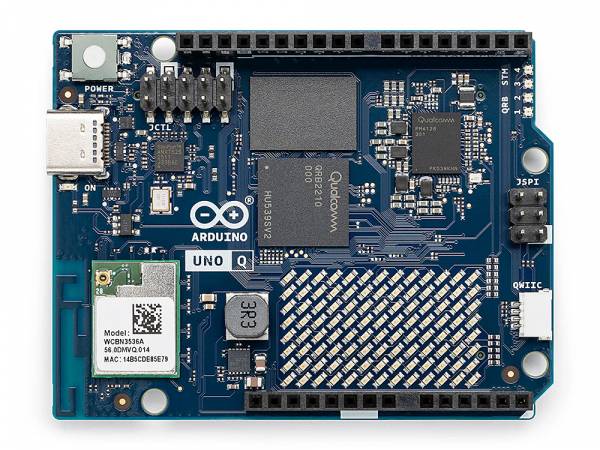
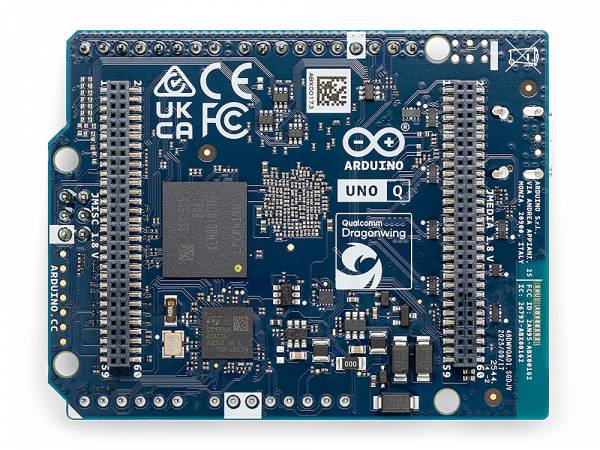
Arduino® UNO™ Q (2 GB RAM / 4 GB RAM)
€64.66 *
Content: 1 Piece

incl. VAT plus shipping costs

Delivery time: appr. 1-3 days

Execution:

Other customers also order
Learn ARDUINO - Workbook for learning the Arduino development environment
€8.90 *
Our Benefits:
  • Shipping via DHL
  • +100,000 satisfied customers
  • Over 10 years of experience
  • F25111140
  • 6.9 cm x 5.4 cm x 1 cm (L x W x H)
Secure and fast payment with
Amazon PayApple Payeps-ÜberweisungGoogle PayiDEALKlarnaMasterCardPayPalInvoiceVISA
Arduino® UNO™ Q - Linux-capable dual-brain board The Arduino® UNO™ Q extends the classic UNO... more

Arduino® UNO™ Q - Linux-capable dual-brain board

The Arduino® UNO™ Q extends the classic UNO platform with a powerful Linux processor. The board combines a Qualcomm® Dragonwing™ QRB2210 microprocessor with a real-time capable STM32U585 microcontroller.
This allows Linux applications and classic microcontroller tasks to be implemented in parallel on one board.

The UNO Q is suitable for classic Arduino projects as well as for applications in the fields of IoT, robotics and edge computing.

Two computing units, clearly separated

  • Linux® Debian on the microprocessor - for Python applications, network services, data processing as well as image and audio applications
  • Real-time MCU on the STM32U585 - For sensors, actuators and time-critical control tasks

Both units work independently but can communicate with each other.

Typical areas of application

  • Prototyping for IoT and robotics applications
  • Edge AI and local data processing
  • Control tasks with simultaneous Linux application
  • Teaching, training and research

Software & development

The Arduino App Lab is pre-installed on the UNO Q and serves as a central development environment.
It enables the combination of:

  • Arduino sketches
  • Python scripts under Linux®
  • optional, container-based AI models

The Arduino IDE and the Arduino CLI can also be used.

Hardware equipment (all variants)

  • Microprocessor: Qualcomm® Dragonwing™ QRB2210 (quad-core up to 2.0 GHz)
  • Microcontroller: STM32U585 (low-power, real-time)
  • Radio: Wi-Fi® 5 (2.4 / 5 GHz), Bluetooth® 5.1
  • Connections:

  • UNO header for shields
  • High-speed header for camera, display and audio
  • USB-C with Power Delivery and video output (via dongle)
  • Qwiic connection for solderless extensions
  • Display: 8 × 13 LED matrix

Variants - main memory & storage

Arduino UNO Q - 2 GB RAM / 16 GB eMMC

Suitable for:

  • Cost-conscious projects
  • Development with PC connection (SSH, remote access)
  • Single Linux applications without heavy multitasking
  • No or very light edge AI
  • Basic memory requirements

Technical data

  • RAM: 2 GB LPDDR4
  • Memory: 16 GB eMMC

Arduino UNO Q - 4 GB RAM / 32 GB eMMC

Suitable for:

  • Stand-alone operation as a single-board computer
  • Parallel processes and multitasking
  • Larger AI models and image/audio processing
  • More local memory for data and development environments

Technical specifications

  • RAM: 4 GB LPDDR4
  • Memory: 32 GB eMMC

Summary

The Arduino® UNO™ Q is aimed at users who need more than a classic microcontroller but still want to remain in the Arduino ecosystem.
By choosing the right variant, the board can be adapted to specific project requirements - from lean embedded applications to Linux-based systems with higher resource requirements.

FAQs - Arduino® UNO™ Q

What is the Arduino UNO Q?
The Arduino UNO Q is a Linux-capable development board from the UNO family. It combines a quad-core Qualcomm Dragonwing™ QRB2210 with GPU and an STM32U585 microcontroller. This allows Linux applications, real-time control and lightweight AI functions to be combined on a single platform.

Is the UNO Q open source?
Yes. The UNO Q schematics and Gerber files are available under the CC-BY-SA 4.0 license.

Which development environment do I need for Linux and Arduino applications?
The Arduino App Lab is already pre-installed on the UNO Q. Simply connect the board to your computer and load Arduino App Lab - without any complex configuration.
If you use the UNO Q as a single-board computer (SBC), a USB-C dongle with keyboard, mouse and monitor is all you need to get started right away.

Which operating systems are supported by Arduino App Lab?
Arduino App Lab runs on all common operating systems:

  • Windows 10 or newer (64-bit)

  • macOS 11 or newer (64-bit)

  • Ubuntu 22.04 or newer

  • Debian Trixie (64-bit)

In addition, Arduino App Lab is already installed natively on the Debian operating system of the UNO Q.

Can I continue to use the Arduino IDE?
Yes. You can use the Arduino IDE or the Arduino CLI as usual to run sketches on the microcontroller subsystem. However, to exploit the full potential of the UNO Q - including Python® and AI integration - we recommend using Arduino App Lab.

How do I connect a keyboard, mouse and monitor to the UNO Q?
Via a USB-C dongle with Power Delivery (PD) and video output. The dongle supplies the board with power and simultaneously provides connections for the display and USB peripherals. Important: The UNO Q will not start without Power Delivery. The 4 GB RAM version is recommended for stand-alone operation.

Can I develop wirelessly with the UNO Q?
Yes. Simply connect the UNO Q and Arduino App Lab via WLAN or Ethernet in the same network. Parallel development with several boards is also possible.

UNO R4 or UNO Q - which board is the right one?

  • UNO R4: Pure microcontroller board for energy-efficient real-time applications, sensors, actuators and classic IoT projects. Ideal for learning, prototyping and hardware-related developments.

  • UNO Q: Extension of the UNO concept with a Linux-capable processor. Ideal for AI applications, image and audio processing as well as complex web or edge applications - with simultaneous real-time hardware control via the STM32.

2 GB or 4 GB RAM - which variant should I choose?

  • 2 GB: For cost-optimized, dedicated and lighter applications.

  • 4 GB: For stand-alone operation, multitasking, demanding AI models, higher system reactivity and more local memory requirements.

Is Arduino App Lab open source?
Yes. Both Arduino App Lab and the App Bricks Library are open source. The corresponding source code repositories are publicly available.

Further links to "Arduino® UNO™ Q (2 GB RAM / 4 GB RAM)"
Zubehör
Read, write and discuss reviews... more
Customer reviews for "Arduino® UNO™ Q (2 GB RAM / 4 GB RAM)"
Write rating
Reviews will be activated after verification.
Please enter the string in the text field below.

The fields marked with * are required.

Last viewed