XH-M194 timing relay with five channels, 12V
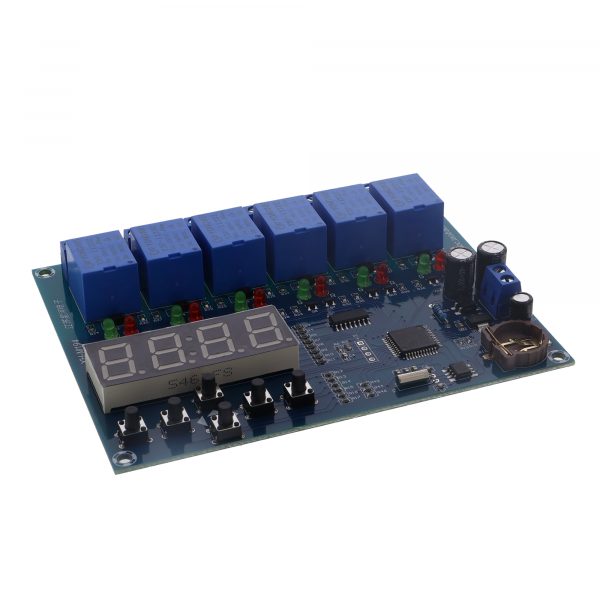
The XH-M194 module can control up to five independent relays as well as an additional central collective relay. Each relay can output either a normally open or normally closed contact.
The switch-on and switch-off time can be set individually for each of the five relays. Within these times, the relay controls the respective load.
The module is suitable for numerous applications, such as
- Motor control
- Pump control
- Boiler control
- General time control tasks
Technical data
- Model: XH-M194
- Type: Multi-channel time control module with 5 relays
- Power supply: AC/DC 12 V
- Output: Relay output, max. 250 V / 10 A
- Screen size: 50 x 19 mm
- Time accuracy: ±1 minute
- Module dimensions: 120 x 93 x 19 mm
Key and display explanation
- Red LED: Channel time control is off.
- Green LED: Channel time control is active.
- Set button: To call up the menu (P001 to P007).
- Return button: To return to the previous menu.
- Up button: Increase value, set time.
- Down button: Decrease value, set time.
- Left button: Move the cursor to the left.
- Right button: Move cursor to the right.
Menu overview
| The menu | Menu Function | Setting range | Factory setting |
|---|---|---|---|
| P001 | Channel 1 on/off | ON / OFF | OFF |
| P002 | Channel 2 on/off | ON / OFF | OFF |
| P003 | Channel 3 on/off | ON / OFF | OFF |
| P004 | Channel 4 on/off | ON / OFF | OFF |
| P005 | Channel 5 on/off | ON / OFF | OFF |
| P006 | Set system time | 00:00 - 23:59 | 00:00 |
| P007 | Time correction (fine adjustment) | -59 to +59 seconds | 0 |
Internal settings
- 0F / 0FF: Switch channel on or off (applies to P001 to P005).
- H1: Switch-on time of the relay.
- H2: Switch-off time of the relay.
This is how it is set:
- Call up the menu: Press "Set" once to access the menu P001 to P007.
- Activate channel: Select a channel (P001 to P005) and press "Set". Use the up/down buttons to set the channel to "ON".
- Set the time: Press "Set" until "H1" is displayed - this is the switch-on time. Use the arrow buttons to set the desired time. Then "H2" is displayed - this is the switch-off time.
- Restore the factory setting: Press and hold "Up" and "Down" at the same time and switch on the power supply. The module performs a self-test and resets all values.
Example of use
- Setting the system time: Call up menu P006 and set the current time.
- Activate first channel: Set the channel to "ON" in menu P001.
- Set switch-on and switch-off times (H1/H2).
- Special feature: The sixth relay serves as a collective output. It always switches on when one of the five relays is active - ideal for a central status display.
Scope of delivery
- 1x XH-M194 - Timer relay with five channels, 12V